Subscription, plans and billing
See your plan and usage, subscribe or change plans, manage billing and cancel from the Subscription section.
- Available on All plans
- For All workspace members
What it is
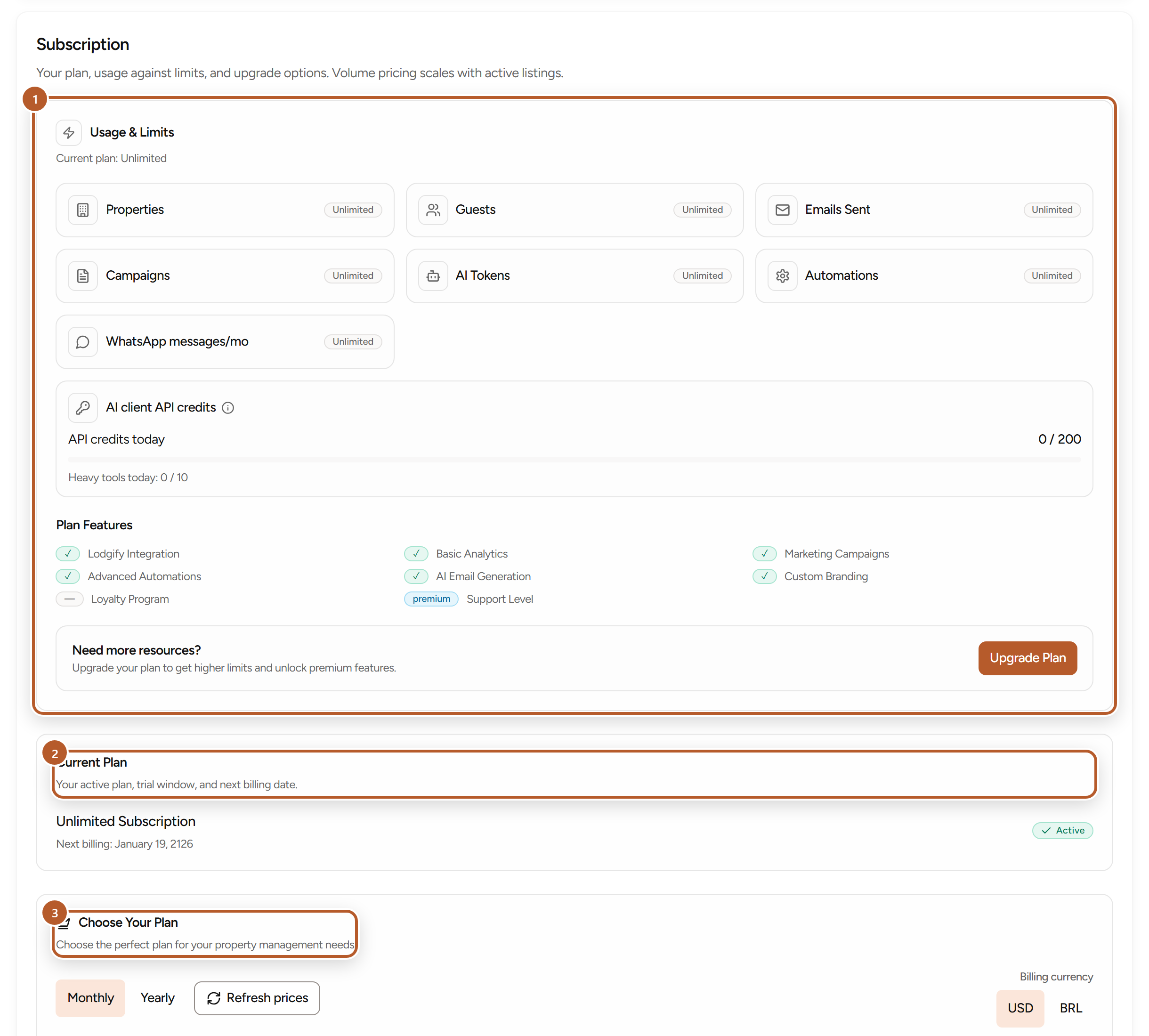
The Subscription section, on the Account tab of Settings, shows your plan, your usage against limits and your upgrade options. The plans are Starter (1 to 2 properties), Pro (1 to 20) and Enterprise (1 to 50), and the price changes with your listing count. Subscribing, changing plans, managing billing and cancelling all happen here.
Step by step
- Open Settings > Account and scroll to Subscription (/settings?tab=account).
- Under Current Plan, check the trial days left, your next billing date or the No active subscription notice.
- Under Usage & Limits, follow Properties, Guests, Emails Sent, Campaigns, AI Tokens and Automations.
- Under Choose Your Plan, pick Monthly or Yearly, the Billing currency (USD or BRL) and your listing count. When a feature is not part of your plan, the screen shows a lock card naming the plan you need:
| Feature | Plan required |
|---|---|
| WhatsApp, WhatsApp Flows, AI Concierge | Pro |
| Meta & Instagram | Pro |
| Site Builder (early access: only accounts enabled by SparkOS) | Pro |
| Abandoned booking recovery, MCP access | Enterprise |
| Teams & Agencies, Custom fields | Enterprise |
- On the plan card, click Subscribe, Upgrade (during the trial), Subscribe Now (trial expired) or Change Plan (active subscription). Your current plan shows Current Plan.
- Complete payment in the secure checkout.
- To change your card or see invoices, click Manage billing, which opens the billing portal.
- To cancel, click Cancel subscription and confirm with Yes, cancel at period end.
Cancel subscription? You keep full access until the end of the period. After that, premium features will be limited until you subscribe again.
What happens next
- When you return from checkout, the Account tab shows Subscription updated successfully!. If you back out, you see Subscription update was cancelled.
- Cancellation is scheduled: your plan stays active until the date shown and you are not charged again after it.
- If a payment fails, a payment-pending banner appears at the top of the app with a button to update your payment. In the last 3 days of the trial, a trial-ending banner appears.
FAQ
Does my price change when prices change?
No. Your current subscription keeps its existing rate on renewal. New prices apply when you upgrade tier or start a new plan.
Does Team work during the free trial?
No. Teams and Agencies require paid Enterprise, including during the trial.
Can I pay in reais?
Yes. Pick BRL under Billing currency. If you see No plans available for this currency and billing period, try the other period or currency.
Where does the Upgrade Plan button on a lock card go?
To this same section on the Account tab, where you choose the new plan.
Updated on 10/2/2026