Run a flow for contacts
Start a WhatsApp flow for one or several contacts from Contacts or a guest profile, with test mode when only one contact is selected.
- Available on Pro
- For Account owner
What it is
Run flow puts contacts you choose into a WhatsApp flow without waiting for an automatic trigger. The button sits in the Contacts selection bar and at the top of a guest profile. The dialog lists only active flows that have an active Run on a contact trigger.
Before you start
- WhatsApp flows are part of the Pro plan. Outside it, each contact is skipped with the reason “plan limit”.
- The flow must be active and have a Run on a contact trigger with its switch on in Flow triggers. With no such flow, the dialog shows “No active flow with a manual trigger.”
- Team members only see the button with the Act level on Marketing & Studio.
Step by step
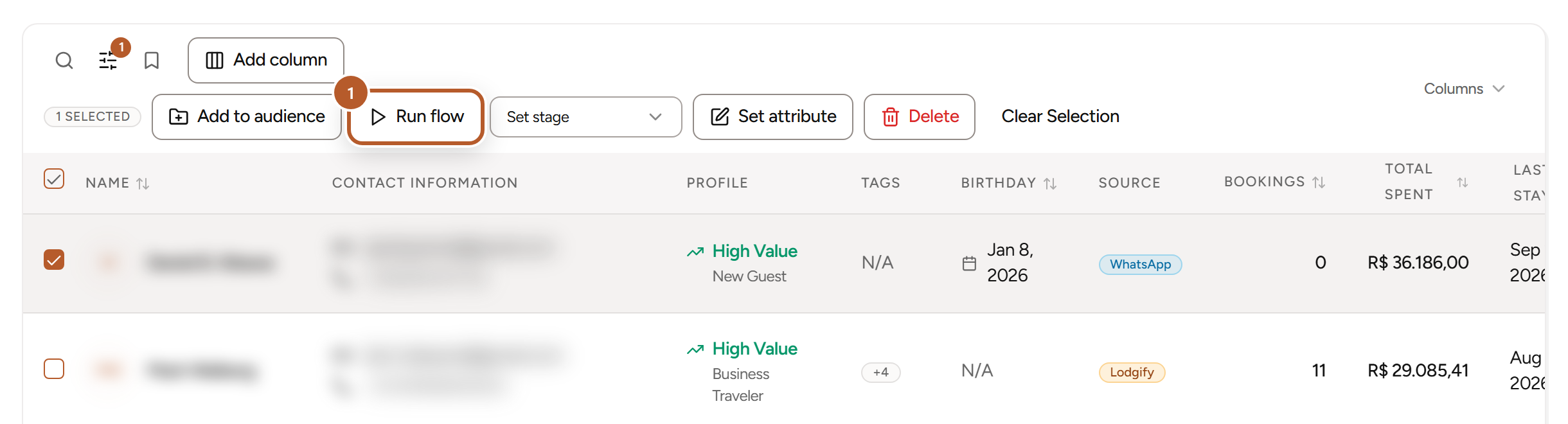
- In Contacts (/contatos), tick the contacts in the table and click Run flow, right after Add to audience. For one person, open their profile and click Run flow, next to Edit Guest Information.
- In the Run a flow dialog, pick the flow in the left list. Search flows… filters by name and description.
- On the right, check the flow preview and the summary, for example “Runs for 12 contacts · sends messages for real”.
- With a single contact, decide whether to turn on Test mode (see below).
- Click Run flow.
If the right flow does not exist yet, New flow creates a draft and opens the builder with the Run on a contact trigger already chosen.
Test mode
Only available with exactly one contact selected. The summary changes to “Test run for 1 contact · waits collapsed, external actions simulated”. The test runs the saved version of the flow: Wait steps pass almost at once, and Action and App action steps are simulated, which means they are recorded in the run without really running. Test mode does not hold back messages: they reach that contact for real.
What happens next
Without test mode, the notice shows the engine’s counts, such as “18 runs started · 2 skipped (already running)”, with a See runs action. With up to 3 contacts the runs start right away; with more, the engine starts them on its next pass. With test mode you see “Test run started”, and See run opens that run’s replay.
| Skip reason | What it means |
|---|---|
| already running | The contact is already in a live run of this flow |
| plan limit | The account’s plan does not include WhatsApp flows |
| not found | The contact does not belong to the account |
FAQ
Can I run a flow for more than 500 contacts?
Not in one go. Above 500, the button is disabled and the summary shows “Select up to 500 contacts.”
Why is test mode greyed out?
It only works for one contact: “Available when exactly one contact is selected.”
Does a test stop a real run?
Yes. If the contact is already in a live run of this flow, that run is ended to make room for the test.
Where do I see test runs?
In the flow’s runs, with Include tests ticked. They carry the test badge.
Updated on 10/2/2026