Cancel a reservation and refund
Cancel a reservation to release the dates and notify the guest, and request a refund of a payment collected through SparkOS.
- Available on All plans
- For Owner and team members with the Reservations permission
What it is
A reservation’s page has two buttons at the top. Cancel reservation releases the dates and notifies the guest. Request refund returns a payment collected through SparkOS, once the refund is approved by email. They are separate actions: cancelling does not return money.
Before you start
- Cancel reservation shows while the reservation is not cancelled.
- Request refund shows when the reservation has a payment received and has not been refunded yet. Refunds only work for payments made through a SparkOS charge via Asaas.
Step by step
Cancel
- In Reservations, open the reservation and click Cancel reservation.
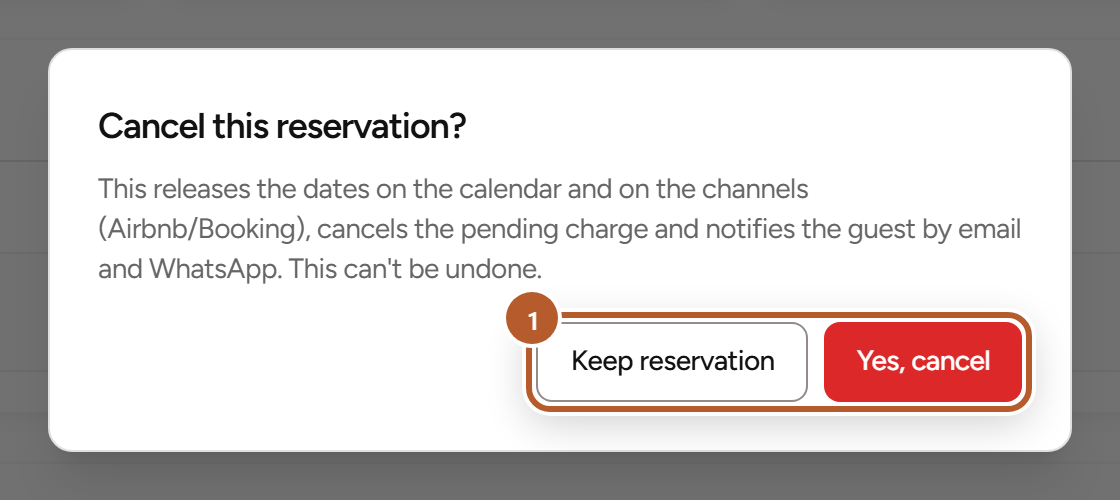
- Read the warning: “This releases the dates on the calendar and on the channels (Airbnb/Booking), cancels the pending charge and notifies the guest by email and WhatsApp. This can’t be undone.”
- Click Yes, cancel, or Keep reservation to back out. When it finishes, SparkOS shows “Reservation cancelled — dates released.”

Refund
- On the same page, click Request refund.
- Read the warning: “We’ll email the host for approval. The refund through Asaas only goes out after they confirm. Once confirmed, the dates are released and the guest is notified.”
- Click Send for approval, or Back to back out.
- Open the “Aprovar reembolso” email sent to the account’s email address, click Revisar e aprovar reembolso, and on the page that opens, click Confirmar reembolso.
What happens next
- When you cancel, the reservation is cancelled on your connected PMS (Lodgify or Stays), its status changes to cancelled, open charges are voided, and the guest is notified by email and, if they have a phone number, by WhatsApp. If the reservation was already paid, the message tells the guest the host will arrange the refund.
- When the refund is confirmed, SparkOS returns the amount of the reservation’s most recent paid charge through Asaas, releases the dates and notifies the guest. The approval link works once: opened again, the page shows “Já processado” (already processed).
FAQ
What is the difference between cancelling and Delete in the Table?
Delete removes the record from SparkOS without the cancellation flow: it does not release the dates on your PMS or notify the guest. To do that, use Cancel reservation.
If I request the refund twice, is the guest refunded twice?
No. If a request is already waiting for approval, SparkOS shows “A refund request is already awaiting approval.” instead of creating a second one.
Why did the refund request fail?
It fails when the reservation has no charge paid through Asaas, meaning the money received did not come from a SparkOS charge.
Updated on 10/3/2026