Flow runs: canvas replay, attempts and retry
See every run of a WhatsApp flow drawn on the canvas, inspect each step and retry a failed run from the step that failed.
- Available on Pro
- For Owner and team members with the Marketing & Studio permission (Marketing role); retrying needs the Act level
What it is
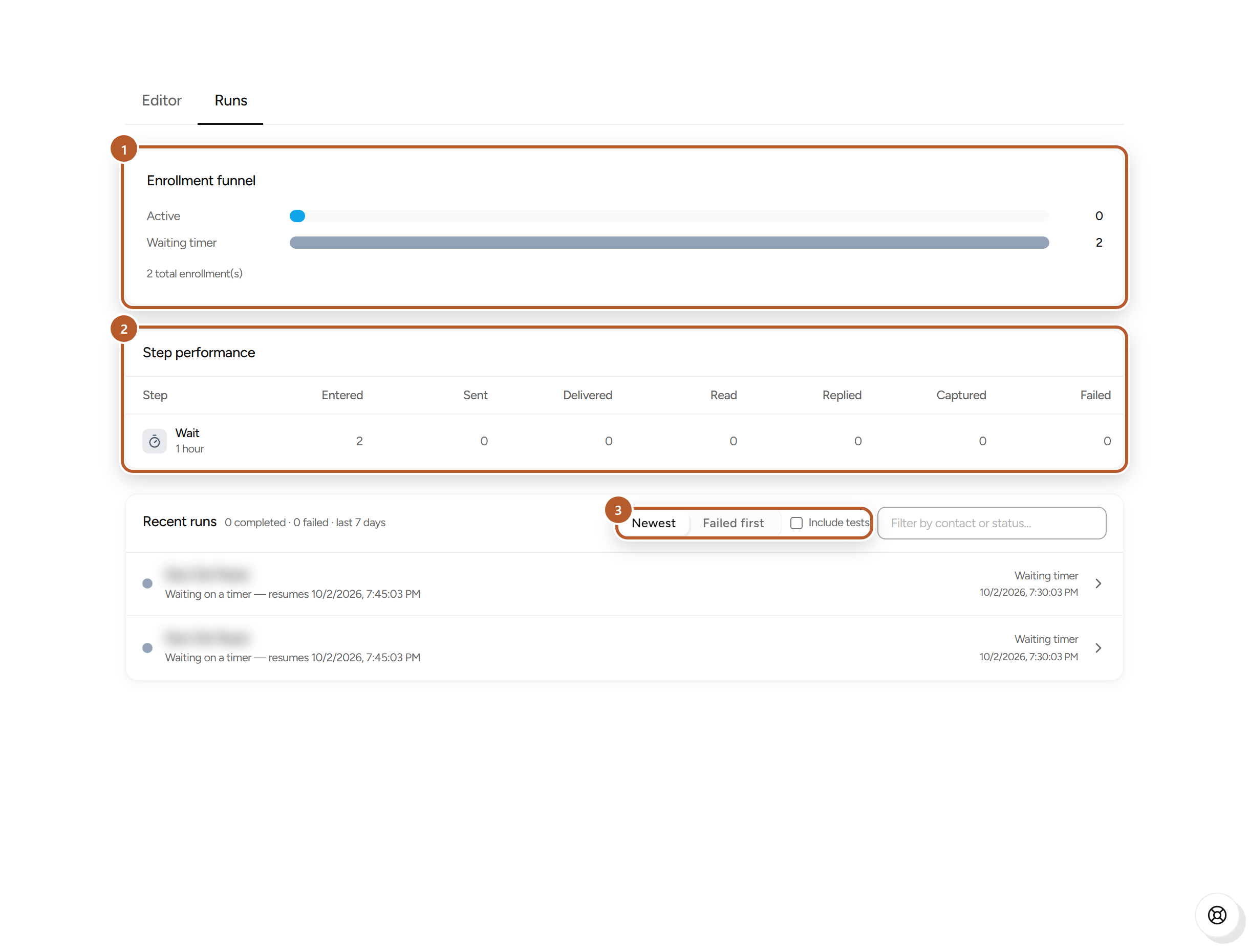
The Runs tab of a WhatsApp flow shows how the flow is doing and what happened to each contact. Each run opens as a replay: the flow on a read-only canvas, with the path taken, the result of every step and a details panel.
Before you start
WhatsApp flows are part of the Pro plan.
Step by step
- Open the runs from the builder’s Runs tab (/campaigns/whatsapp/flows/:id/runs), from View runs in the row menu under Marketing → Flows, or from the Run flow notice.
- At the top you find the Enrollment funnel and Step performance. Below, Recent runs carries the count for the last 7 days, tests excluded, such as “12 completed · 2 failed · last 7 days”.
- Sort by Newest or Failed first, tick Include tests and use Filter by contact or status…. A retried run shows, for example, “2 attempts”.
- Click a run. On wide screens it opens in Canvas; on narrow screens in List, with the steps in order.
- On the canvas, the path taken is highlighted and the paths not taken are dashed and faded. Each step carries a badge: ok, failed, waiting, skipped, running or interrupted.
- Click a step, on the canvas or in the List, to see Status, Runtime and Executions (how many times it ran), the failure in plain words and the Readable view, with Details and Outputs, or the Raw view, with Input and Output. The trigger step shows the Trigger data. With no step selected, the panel sums up the run: status, version, Started and Duration.
- Use the Switch run icon to open another run of the same flow and the All runs icon to go back to the list.
Attempts and retry
On a run with status Failed, click Retry from the failed step. The engine resumes at that step: earlier steps do not run again and, inside an Action step, actions that already succeeded are skipped. You see “Retry scheduled (attempt 2). The engine resumes at the failed step within 5 minutes.” A switcher with Attempt 1 and Attempt 2 then appears; picking an attempt repaints the canvas.
| When | What SparkOS does |
|---|---|
| The step had already sent a message before failing | Blocks the retry, so the message is not sent twice |
| The flow is not active | Answers “The flow must be active to retry.” |
| The last step never recorded an outcome | Disables the button: there is no way to know whether the message went out |
What happens next
While the run is still going, the page updates on its own. Every real run executes the flow version published when the contact entered, and the replay draws that version, shown in the panel (for example, v3). If that version was deleted, the canvas uses the current flow and shows version missing.
FAQ
Why does the replay not show my latest edits?
Because it draws the version the run executed, not what is in the builder now.
Who can retry?
The owner and members with the Act level on Marketing & Studio. With View, they can read the runs but the button does not show.
Updated on 10/2/2026