Instagram: start a flow from a DM
The Instagram DM trigger starts a flow when someone sends a direct message, with or without a keyword, and answers inside the 24-hour window.
- Available on Pro
- For Owner and team members with the Marketing & Studio permission (Marketing role)
What it is
The Instagram DM trigger starts a flow when a person sends a direct message to your account. Because the person has just written, the 24-hour window is open and the flow can answer right away with direct messages.
It is a trigger of its own, separate from Message received and Keyword: those two are WhatsApp only. A WhatsApp flow you already have never starts answering on Instagram by itself.
Before you start
- Instagram connected under Settings → Connections.
- The flow builder is part of the Pro plan.
Step by step
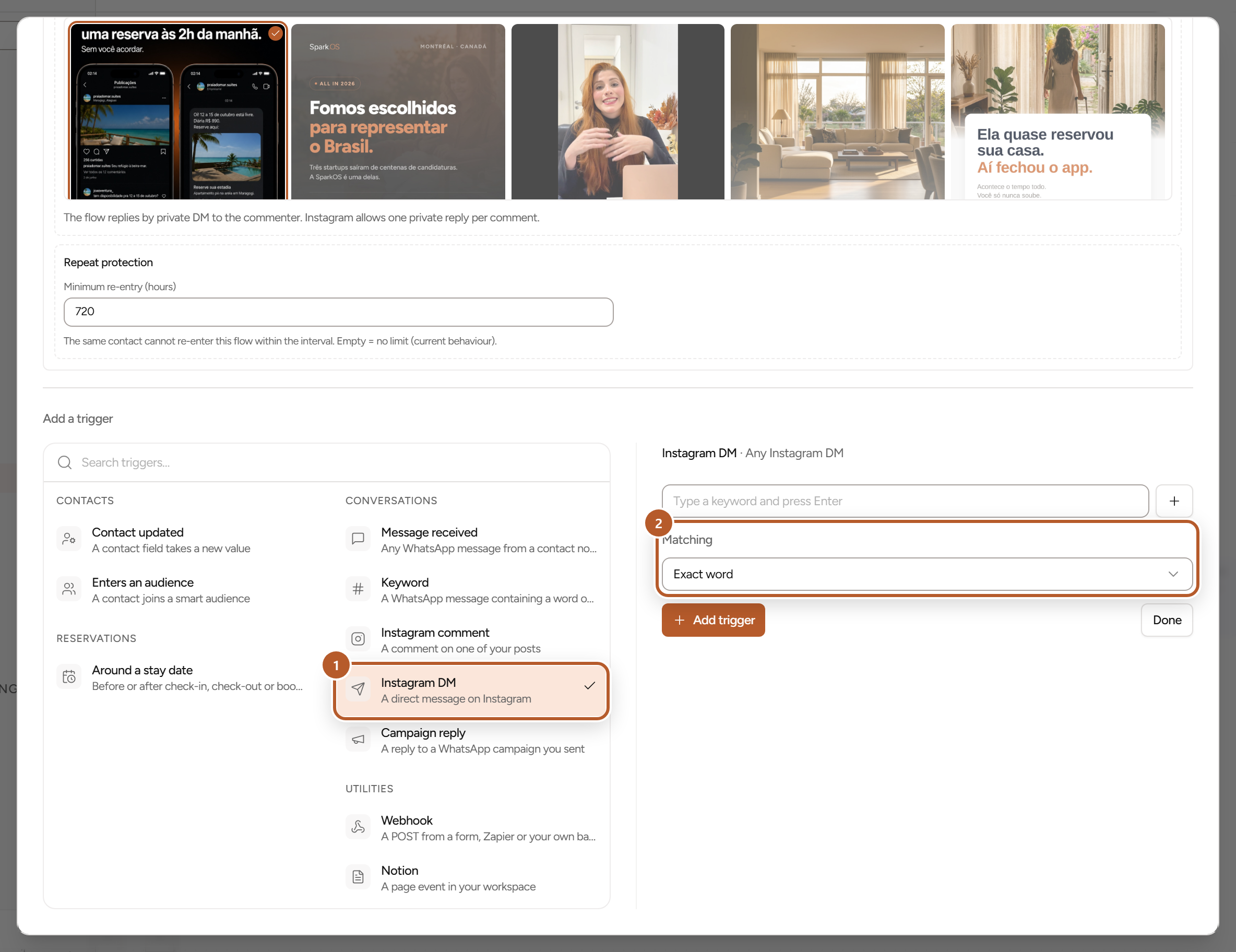
- Under Marketing → Flows, create a flow or open an existing one and click Triggers → Add trigger → Instagram DM.
- Type keywords, or leave it empty to fire on any DM. The summary line reads Any Instagram DM, or the words followed by Instagram DM.
- Under Matching, Exact word fires when the word (or phrase) appears in the message spelled the same way; Fuzzy (typos allowed) tolerates small typos.
- Click Add trigger, then Done. Once saved, set Minimum re-entry (hours) under Repeat protection if you do not want the same person to restart the flow with every message.
- Add Instagram reply steps with Delivery type = Direct message (24-hour window). The Private reply to the comment and Public reply under the comment types are disabled: there is no comment on this run.
- To ask something, use Action = Ask for a reply (opens the window) with Quick replies; the person’s reply resumes the flow and can be read in a Condition with the source Answer to a question.
- Save and Activate. Test by sending a DM from another account.
What happens next
- The DM arrives through the webhook, the conversation shows under the Instagram tab of the Inbox, and the person lands in Contacts as @username. A reply to a story counts as a DM too.
- If the person was already in a run waiting for a reply (for example, after a “YES”), the DM resumes that run instead of starting another. Only then does SparkOS look for an Instagram DM trigger to start a new flow.
- While a flow owns the conversation, the Inbox AI assistant does not answer over it.
- Every new message from the person renews the 24-hour window. If the flow reaches a direct message while the window is closed, it waits and resumes when the person writes again.
FAQ
Why doesn’t my WhatsApp keyword flow fire on an Instagram DM?
Because Keyword and Message received are WhatsApp triggers. Add an Instagram DM trigger to the same flow if you want both channels; in that case, only use steps that work on both (plain text).
The person replied and the flow started again. How do I avoid that?
Set Minimum re-entry (hours) on the trigger. A run that is waiting for a reply is never duplicated: the DM resumes the existing run.
Can I use {{instagram_handle}} on a run that started from a DM?
Yes, when SparkOS could read the person’s @; when it could not, the variable is left empty instead of showing as literal text.
Updated on 10/10/2026