Connect Stays.net
How to link Stays.net to SparkOS with the External API login and password, and how to enable real-time updates.
- Available on All plans
- For All workspace members
What it is
Stays.net is one of the channel managers SparkOS supports. Once connected, it provides properties, bookings and guests, and Stays conversations reach the Inbox. The connection uses the Stays External API (Swagger) login and password, which differ from the panel login, plus your account address.
Before you start
- In Stays.net, go to App Center → Stays API → External API (Swagger), enable API access and copy your Login and Password.
- Have your account address ready, for example youraccount.stays.net.
- Only one channel manager is active per account.
Step by step
- Open Settings → Connections (/settings?tab=integrations) and click Connect on the Channel Managers card.
- On the Stays.net row, click Connect.
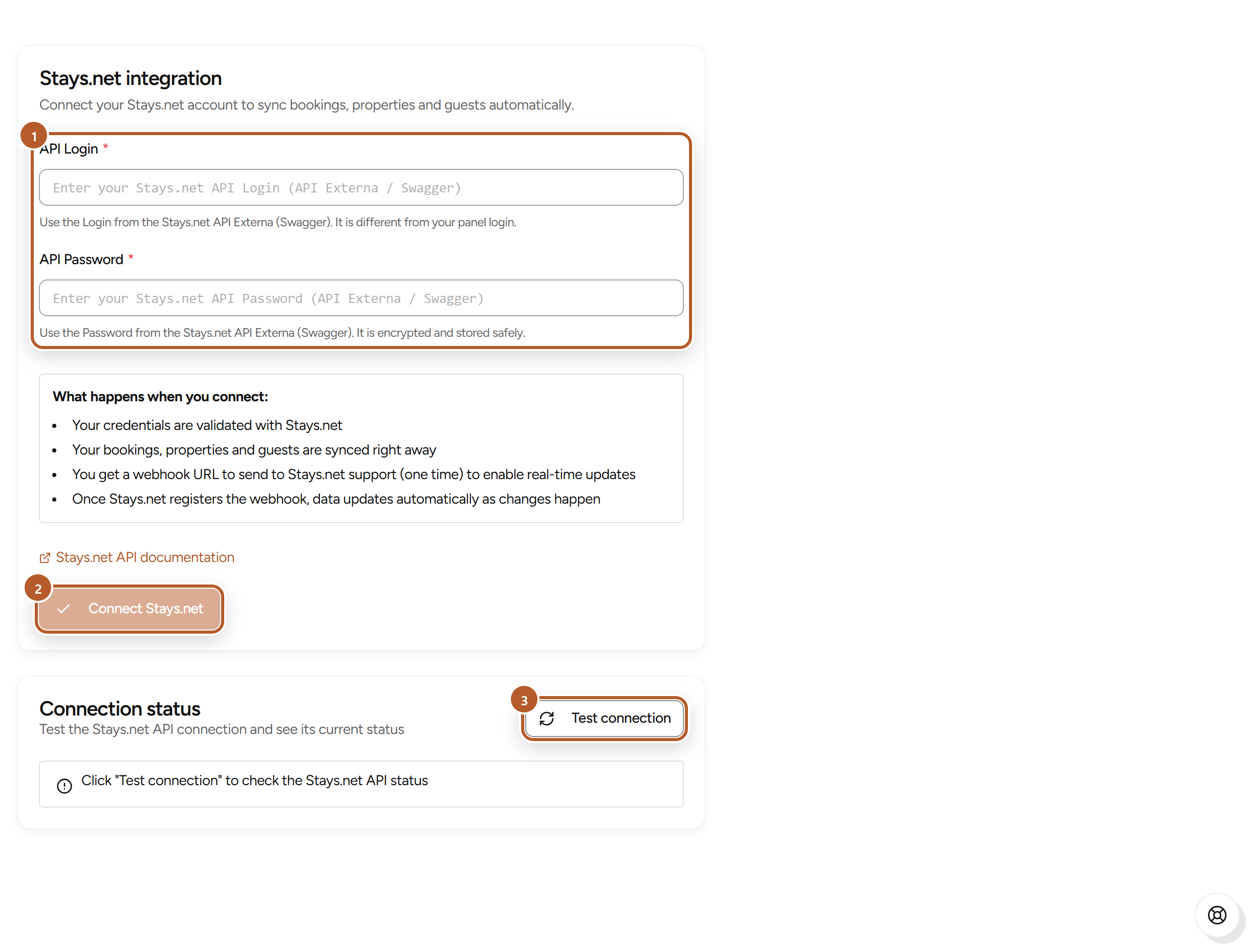
- In the Connect Stays.net window, fill in API Login, API Password and Stays URL / Account ID (the full URL, the subdomain or just the account name all work). Click Connect.
- On the account’s first PMS connection, confirm Authorize PMS Connection with Authorize Connection.
- The button switches to Verifying…. When it finishes, Stays.net connected successfully! appears.
Dedicated page and webhook
The /integrations/staysnet page has the same form: Stays API Login, Stays API Password and the Connect Stays.net button. Once connected, it shows a support-ticket template for Stays.net support with your account’s webhook URL, used to enable real-time updates, plus the Connection Status Logger panel, whose Test Connection button tests API access and explains 401, 403 and 404 responses.
What happens next
- SparkOS validates the login and password by requesting the listings at your account address. A 401 or 403 response means the login or password is invalid.
- SparkOS tries to register the reservations webhook automatically. If Stays does not accept it, send the ticket template from the dedicated page to Stays.net support.
- The initial import runs properties, bookings and guests, and Stays conversations are synced into the Inbox.
- The Stays.net row now shows Connected and Sync enabled.
- Periodically, SparkOS re-imports Stays bookings as a safety net for events that did not arrive, as long as the account ID was provided.
FAQ
Why provide the account ID?
The Stays API lives at a per-customer address. Without the ID, verification uses a default address that may not be your account’s.
How do I disconnect?
On the row menu, click Disconnect and confirm in Disconnect integration. Bookings that came from Stays are archived and active properties become Inactive; nothing is deleted and guests stay in SparkOS. Connecting Stays.net again brings the bookings and properties back. If the webhook was registered through a ticket, ask Stays support to remove it.
Does the Stays panel login work?
No. Use the External API (Swagger) login and password.
Updated on 10/2/2026