Finance: overview
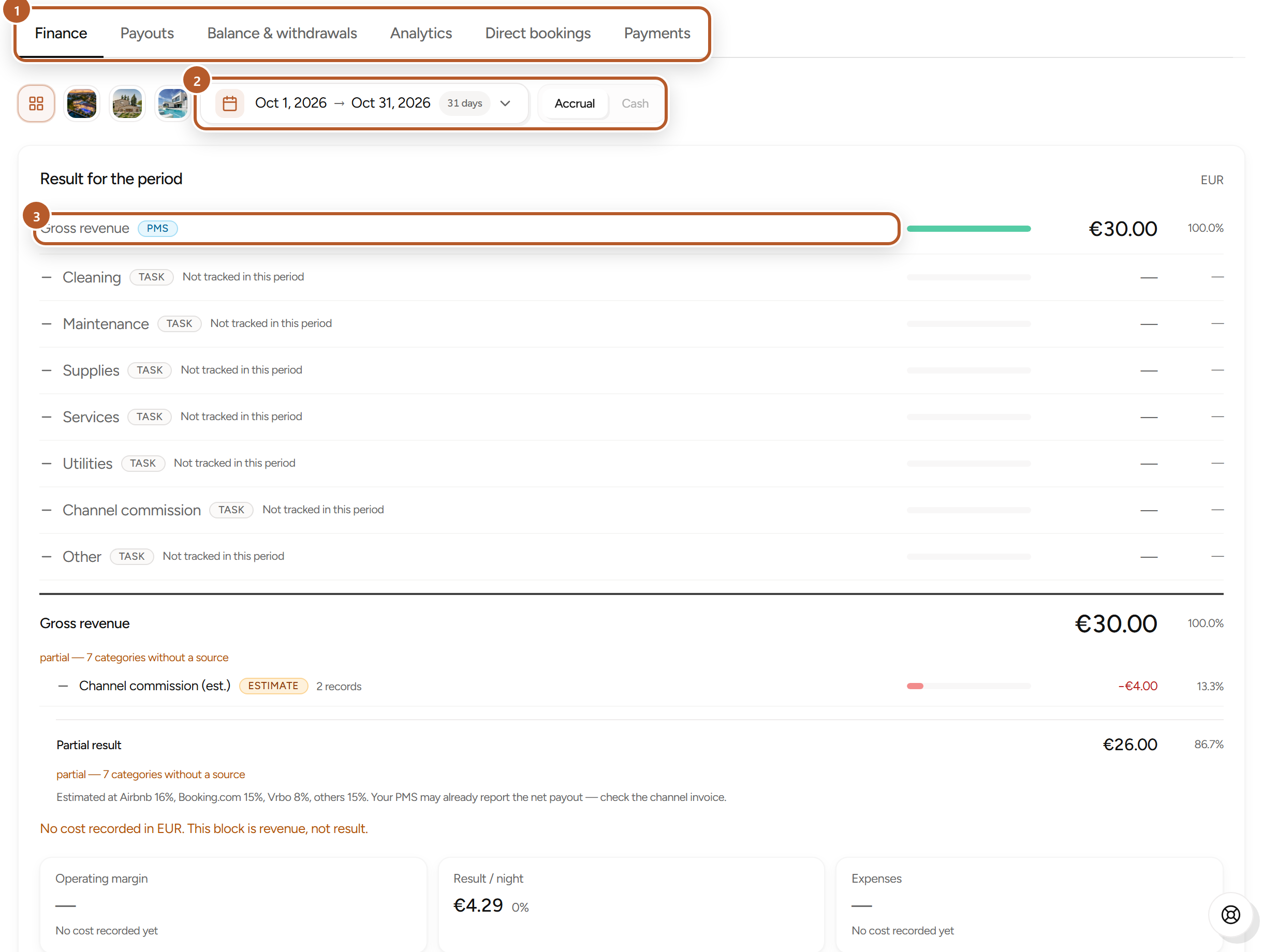
The Finance hub gathers Finance, Payouts, Balance & withdrawals, Analytics and Payments in five tabs; the Finance tab shows the period's gross revenue, by property and currency, next to the cost categories.
- Available on All plans
- For Host account: workspace owner and team members with the Finance module (View or Act level)
What it is
The Finance menu item (/finance) opens a hub titled Money with five tabs: Finance, Payouts, Balance & withdrawals, Analytics and Payments. The Finance tab is built to answer “What came in, what went out, what is left”: gross revenue comes from the reservations of your connected PMS, and costs enter through tasks completed with a cost and through manual ledger entries. Both cost paths are currently in an internal pilot, so on most accounts the screen shows revenue and leaves the cost lines open. The final number is never called net profit.
Before you start
- Reservations in SparkOS. Without them the screen says “Change the period, or connect a PMS so your reservations appear here”.
- Team members need the Finance module at View or Act level, granted by the owner under Settings → Team. Without an assigned property the screen shows “No property assigned to your account”.
Step by step
- Open Finance; the Finance tab is the default.
- In Filter by property, keep All or pick properties; in Check-in range, use a quick-select shortcut or Custom Range and Apply range.
- The Basis switch stays on Accrual; Cash is disabled, with the reason in its tooltip.
- Read the Result for the period panel. The first line is Gross revenue, with the PMS badge. The cost categories follow: Cleaning, Maintenance, Supplies, Services, Utilities, Channel commission and Other; with no cost recorded, each shows a dash and the note “No cost recorded yet”.
- In that state the panel total is labelled Gross revenue, with the note “partial — N categories without a source” and the notice “No cost recorded in [currency]. This block is revenue, not result.”
- When the period has OTA reservations, Channel commission (est.) and a second total, Partial result, appear below, with the note “Estimated at Airbnb 16%, Booking.com 15%, Vrbo 8%, others 15%”.
- Last come the Operating margin, Result / night and Expenses cards; with no cost recorded, Operating margin and Expenses show a dash.
Cost entries (internal pilot)
The Ledger entries section, the New entry button and the Reverse and Correct (reverse & repost) actions only appear for accounts in the internal pilot, like Tasks. On those accounts each posted cost fills its category, the total becomes Operating result (or Partial result while a category has no record) and a reversal never deletes the original entry. On other accounts with no entries, the section is not shown.
FAQ
Why do the cost lines show a dash?
No PMS reports cleaning, maintenance, supplies or utilities — that is what the note “This is the result before operating costs” says. Costs only enter through tasks and manual entries, currently in an internal pilot.
The period is empty, but I have confirmed reservations.
Reservations still to come only count from their check-in date. When another month has revenue, the screen offers a View [month] button.
Can I use cash basis?
Not yet: PMS and OTA reservations carry no payment date, only an undated paid amount.
I have revenue in more than one currency. How is it shown?
Each currency gets its own Result for the period panel; amounts in different currencies are never added together.
Updated on 10/2/2026