Ads (preview): simulate a campaign in Studio
How to simulate, in Studio, an ad campaign for your empty nights and see the estimated results, without launching anything.
- Available on All plans
- For Owner and team members with the Marketing & Studio permission (Marketing role)
What it is
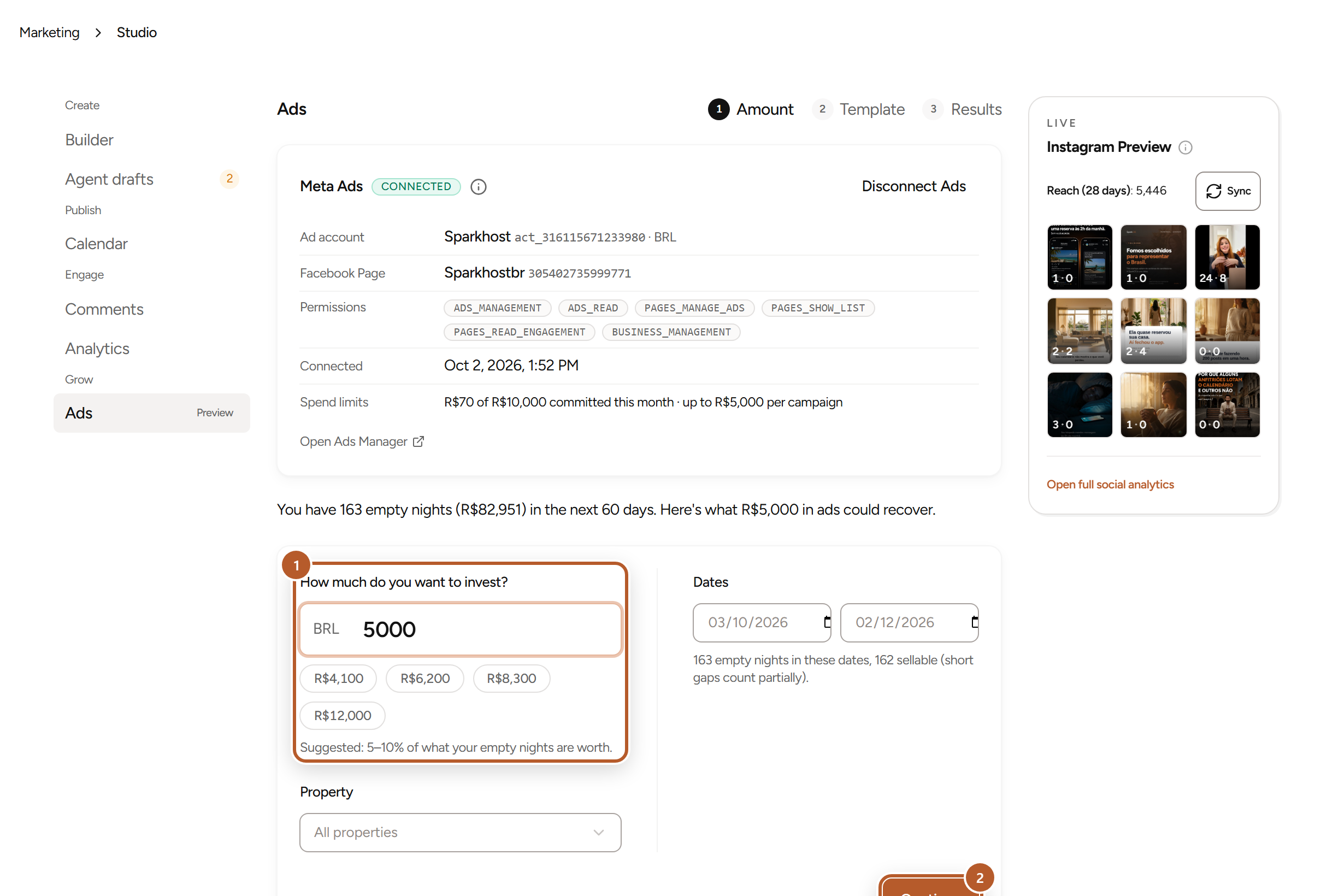
Ads is a Studio section, marked Preview, that simulates an Instagram and Facebook ad campaign to sell the empty nights in your calendar. In three steps, Amount, Template and Results, you set how much to invest, see the ad built with your properties’ photos and get an estimate of what it could bring in. It is a simulation: nothing is launched, charged or sent to Meta.
Before you start
- The numbers come from your active properties and their bookings in SparkOS. With no property, the screen shows No properties yet.
- Estimates exist for BRL and USD accounts. In any other currency, the Results step says projections are not available yet.
Step by step
- In the sidebar, under Marketing, click Studio, then Ads in the Grow group (/marketing/studio?section=ads).
- Under Amount, the line at the top shows how many empty nights you have and what they are worth. Pick the Property (All properties is the default when you have more than one) and the Dates (by default, from tomorrow to 60 days later). Under How much do you want to invest?, the amount comes suggested from your empty nights. Click Continue.
- Under Template, pick one of the five templates:
| Template | What for | Audience |
|---|---|---|
| Gap-night filler | Sell the empty nights in your calendar | Automatic (Meta Advantage+) |
| Property showcase | A carousel of your best photos | Automatic (Meta Advantage+) |
| Book direct, safely | Secure payment and reviews, for people who already know you | People who engaged with your Instagram |
| Seasonal / holiday | Early-booking push for the dates you choose | Automatic (Meta Advantage+) |
| Groups and families | Room for everyone, for bigger groups | Automatic (Meta Advantage+) |
- Switch the preview between Feed and Stories and the ad language between PT and EN. Under Edit text, change the Headline and the Text. The Destination is your WhatsApp, in the SparkOS inbox. Click See potential results.
- Under Results, see the Revenue at stake, the Total cost (budget plus tax, when there is any) and the estimates for People reached, WhatsApp conversations, Bookings, New WhatsApp contacts, Revenue and Return (revenue ÷ cost), each with a likely value and a range. The info icon shows the assumptions.
- Click Launch. Nothing is launched: the Would this help you? survey opens, with four questions. Answer at least whether you would use it and whether you want to join the pilot group, then click Send answers.
What happens next
SparkOS records how far you got and your survey answers. If you picked Yes, count me in, the screen confirms, once you send, that you are on the pilot list.
FAQ
Does clicking Launch publish the ad?
No. Ads is a simulation: nothing is launched, charged or sent to Meta, and you do not need to connect an ad account.
How is revenue estimated?
From your average nightly rate over the last 12 months or, with little history, from the listing price. With no nightly price at all, Revenue and Return (revenue ÷ cost) are not estimated. Estimated bookings never exceed what the empty nights can hold.
What does the budget warning mean?
The amount is more than the dates can earn: “Your budget is larger than what these dates can earn. Add more properties or dates.”
Updated on 10/2/2026