Instagram: ask for a reply, then send the link by DM (two steps)
The right way to deliver a link to someone who commented: a private reply that asks for a "YES", and the direct message with the link only after they answer.
- Available on Pro
- For Owner and team members with the Marketing & Studio permission (Marketing role)
What it is
The two-step automation is how you deliver a resource (a guide, a list, a page on your site) to anyone who comments a keyword on your post. It exists because of three Instagram rules:
- The private reply to a comment is one per comment, within 7 days, and it does not open the 24-hour window.
- A direct message can only be sent while the 24-hour window is open, and only the person opens that window, by writing to you.
- A first message with a link, from an account the person does not follow, tends to be suppressed by Instagram.
So the first step asks for a reply (“YES”) and the second, with the window open, sends the link. The person’s reply is also recorded as their consent to receive the material. One flow does all of it; this article uses the flow Lançamento IG: comenta LINK, recebe no direct as the example.
Before you start
- Instagram connected under Settings → Connections (the Meta (Facebook) card), with a professional account linked to a Facebook Page.
- The flow builder is part of the Pro plan.
- The post that will receive the comments is published, and the caption asks for the keyword (for example, “comment LINK”).
Step by step
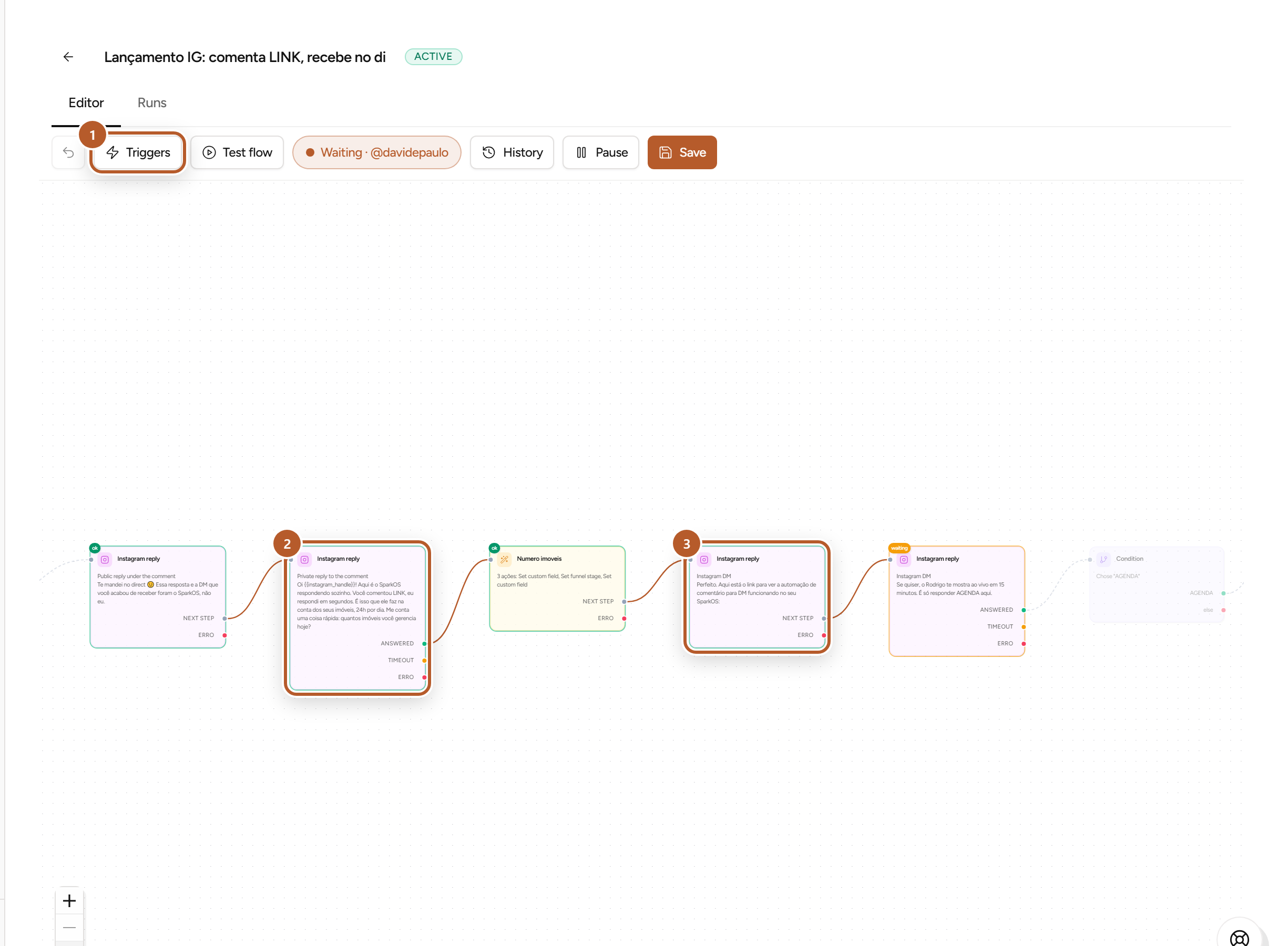
- Under Marketing → Flows (/marketing/flows), click New flow → WhatsApp flow. A flow’s channel comes from its trigger, not from its name.
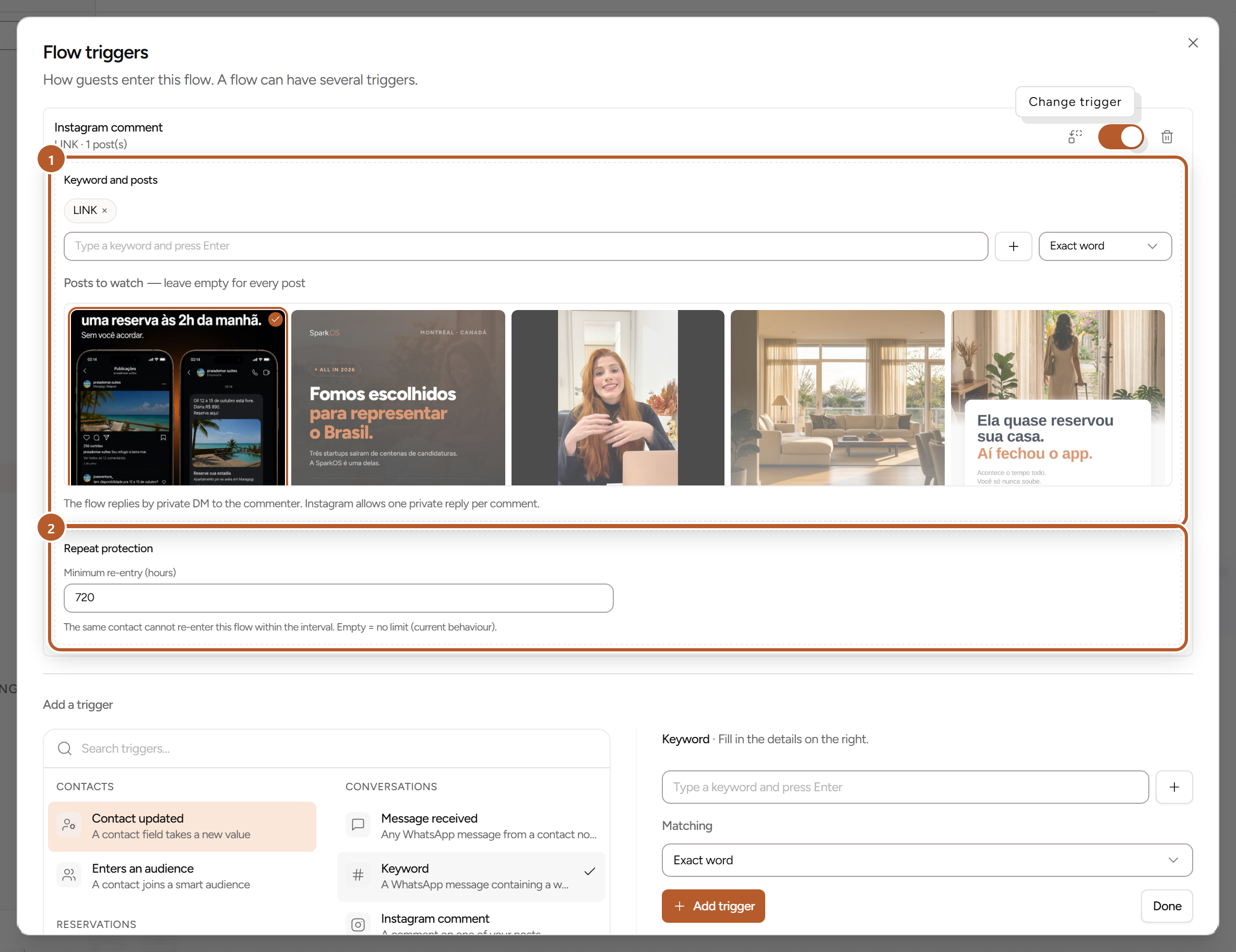
- Click Triggers → Add trigger → Instagram comment. Type the keyword (LINK), keep Matching on Exact word and, under Posts to watch, select the post. Click Add trigger, then Done. Once saved, the trigger gains a Repeat protection section: in Minimum re-entry (hours) enter, for example, 720 so the same person does not get the material again for 30 days.
- Add an Instagram reply step and set:
- Delivery type: Private reply to the comment (1 per comment).
- Action: Ask for a reply (opens the window).
- Quick replies: type YES and press Enter. The person sees a button in the Instagram app; tapping it sends the word as their reply.
- Message: the text that asks for the reply. Use
{{instagram_handle}}to address the person by their @ and say what they get by replying. No link here: with a link on this step the flow is not saved.
- Connect the step’s output to a second Instagram reply:
- Delivery type: Direct message (24-hour window).
- Action: Send the resource (link).
- Resource link: the URL. Tick Track visits (UTM) when the link is to your own site: SparkOS adds utm_source=instagram and utm_medium=sparkos_dm, and the Direct bookings report shows the visits that came from it.
- Text that goes with the link and Message: what the person reads before the link.
- Optional: to ask questions and branch, repeat the pair “ask for a reply” → Condition with the source Answer to a question. In the example, the second question offers the quick reply AGENDA and the condition sends whoever answers AGENDA to a message with the booking-calendar link.
- Name the flow, click Save, then Activate. The builder refuses to activate when a step has no message.
- Test it for real: comment the keyword on the post from another Instagram account. Comments from the connected account itself are ignored.
What happens next
- The comment arrives through the webhook and shows up in Studio → Comments. When the keyword and the post match, the flow starts and the row reads Replied.
- The person receives the private reply within seconds. Someone who does not follow your account gets it under Message requests.
- The flow waits for the reply. When the person taps YES (or writes anything), the 24-hour window opens and the direct message with the link goes out.
- The person lands in Contacts as @username with the source Instagram, and the conversation sits under the Instagram tab of the Inbox.
- The bell says “@username commented on your post” only for comments that started a flow.
FAQ
Can I skip the question and put the link in the private reply?
No. The builder refuses a link on the private reply and the engine would refuse it at run time too. Even if it were possible, a link-bearing message from an unknown account is usually not delivered.
What if the person never replies?
The private reply is spent (one per comment) and the flow keeps waiting. Nothing else is sent. The row in Studio → Comments stays Replied.
The person commented twice. Do they get everything again?
With Minimum re-entry set, no: the same contact cannot re-enter the flow within the interval. Without it, every matching comment may start a new run, but Instagram still allows only one private reply per comment.
The direct message says it is “waiting for the window”. Why?
The person has not replied yet, so the 24-hour window is not open. The flow resumes by itself when they write.
Can I use the keyword on several posts?
Yes: under Posts to watch, select more than one, or leave it empty for every post. See also Instagram: from comment to DM for the comment triage.
Updated on 10/10/2026