Direct bookings report
Where your site visits come from, how many turned into a checkout, and what share of your stays came direct, on one screen (Finance › Direct bookings).
- Available on All plans
- For Account owner and team members with access to Reports
What it is
Direct bookings is a tab of Finance (/reports/direct) that shows, on one screen, the guest’s path through your site and how much of your stays came direct: visits, the funnel down to payment, where visits come from, stays by channel, WhatsApp conversations, visits by device and the clicks from your email campaigns. Everything comes from one calculation on the server, refreshed every 15 minutes. Nothing is estimated: a rate with no base shows as ”—”, and money is never added across currencies.
Step by step
- In the sidebar, open Finance and click the Direct bookings tab.
- At the top, the pill next to the title shows the active period. The default is Last 30 days. Change it with the date picker (from This month to All time) or filter by Property. The Currency filter only appears when the period has stays in more than one currency.
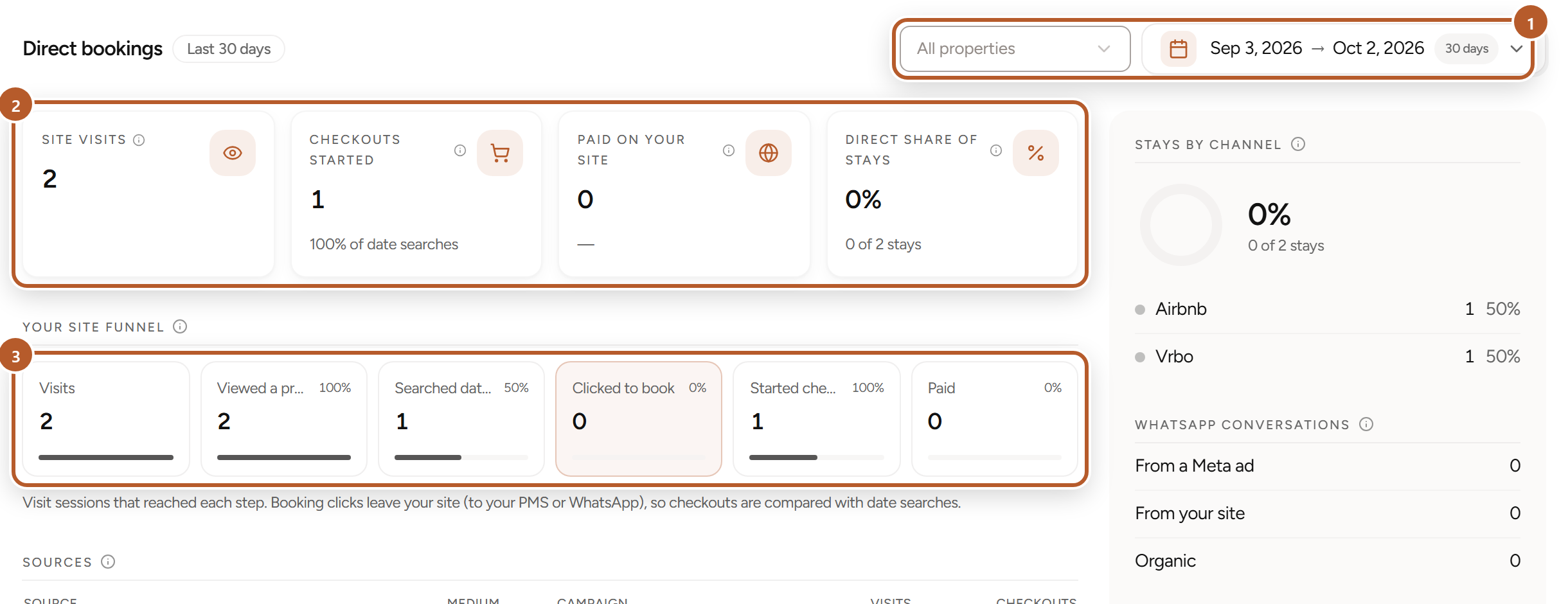
- Read the four numbers at the top:
- Site visits: visit sessions on your sites in the period. Test traffic is excluded.
- Checkouts started: guests who submitted the booking form on your SparkOS site (a hold and a payment link were created). The line below says what share of date searches that is.
- Paid on your site: bookings paid through your SparkOS site in the period, with the amount per currency.
- Direct share of stays: confirmed stays checking in in the period that came direct (your site, your PMS site, manual, or a marketing channel), out of all confirmed stays. The line below reads “N of M stays”.
- Your site funnel has six cards: Visits, Viewed a property, Searched dates, Clicked to book, Started checkout and Paid. On each card, the number is how many sessions reached the stage; the percentage in the corner is the share of the previous stage that got there; the bar is the share of all visits. The Clicked to book card is highlighted: its two-colour bar separates clicks to your PMS booking engine (accent colour) from clicks to WhatsApp (green), and the sentence under the row gives both numbers. Booking clicks leave your site, so Started checkout is compared with Searched dates, not with the clicks.
- Sources is one table, grouped by the channel of each visit (Google, Instagram, Meta ads, Email, WhatsApp, Other website, Direct or unknown). Each group header shows its total visits and checkouts and opens or closes on click. Inside, each row has the channel’s icon, Source, Medium and Campaign (the utm tag on the link, or the site the guest came from), Visits with a bar relative to the biggest row, and Checkouts. These are the ten sources with the most visits. A cell with no medium or campaign stays blank.
- In the right column:
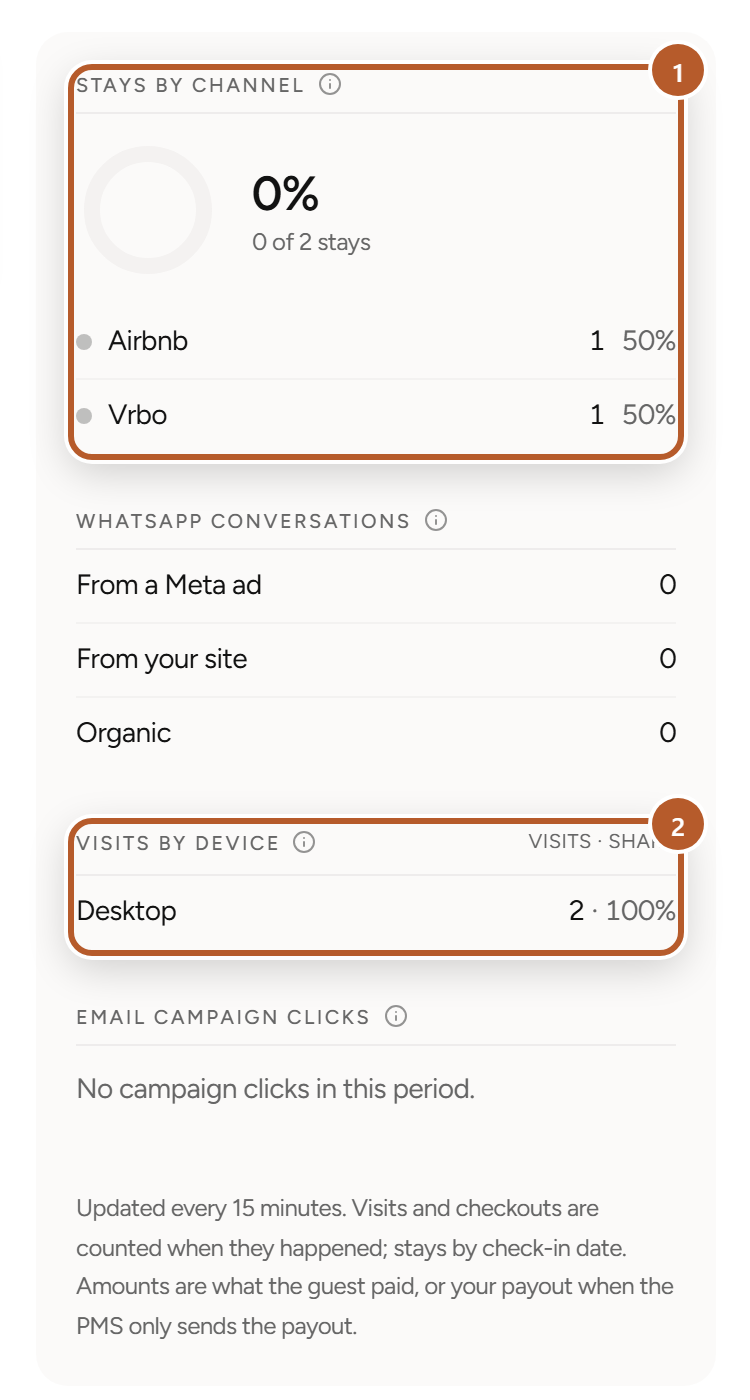
- Stays by channel: the ring shows the direct share; below it, each channel with its number of stays and share of the total. Only confirmed stays checking in in the period; enquiries, cancellations, blocks and owner stays are not counted.
- WhatsApp conversations: new conversations in the period, by where they started: From a Meta ad, From your site and Organic.
- Visits by device: each visit session counted once, by the device of its first page (Desktop, Mobile or Tablet), with its share of all visits.
- Email campaign clicks: each campaign with its link clicks and how many went to your site. Click the name to open the campaign.
- The footer note recalls how the numbers are counted.
What happens next
Nothing here triggers an action: it is a reading. Visits and checkouts are counted when they happened; stays by check-in date. Amounts are what the guest paid, or your payout when the PMS only sends the payout.
When something is missing on the account, the page says so above the numbers and links to the screen that fixes it: No website is sending visits yet (publish your SparkOS site, or paste the tracking snippet into your own website), Website tracking is off, No visits in the last 7 days, No PMS reservations yet and Many stays have no known channel (more than 30% of the stays arrived without a channel from your PMS, so the direct share may be understated).
FAQ
Why is “Started checkout” compared with “Searched dates” and not with “Clicked to book”?
Because a booking click takes the guest off your site (to the PMS booking engine or to WhatsApp). A checkout started on your SparkOS site can happen without that click.
The “Clicked to book” card shows a different number from the sentence “N to your PMS · N to WhatsApp”. Why?
The card counts sessions that clicked; the sentence counts clicks. A session that clicked twice counts once on the card and twice in the sentence.
What goes into “Direct or unknown”?
Visits with no identifiable origin: the guest typed the address, came from a bookmark, or from an app that does not say where it came from.
The direct share is low, but I know I get direct bookings.
Check for the Many stays have no known channel notice. A stay the PMS sends without a channel is never counted as direct, so the number is never invented.
Why does a value show as ”—”?
The base of the rate is zero: with no date searches there is no ”% of searches”; with no stays there is no direct share. A real zero shows as 0.
Updated on 10/2/2026