Sync: what is imported and when
How SparkOS keeps properties, bookings, guests and conversations aligned with your PMS: initial import, webhooks and periodic runs.
- Available on All plans
- For All workspace members
What it is
Once a channel manager is connected, SparkOS keeps properties, bookings and guests aligned with it in three ways: the initial import on connect, the webhooks the PMS sends on every change, and periodic runs that re-read the data. This article shows what comes in at each stage and how to follow the state on the Connections tab.
What is imported
| Data | Lodgify | Stays.net | Guesty | Hostfully |
|---|---|---|---|---|
| Properties | Yes | Yes | Yes | Yes |
| Bookings | Yes | Yes | Yes | Yes |
| Guests | Yes, from bookings | Yes | Yes, from bookings | Yes |
| Inbox conversations | Yes | Yes | When the account has messaging access | No |
| Real-time webhooks | Yes | Yes | Yes | No |
When sync runs
- On connect. The Connect [platform] window shows Connecting to [platform]… (This may take a few minutes.) and imports properties, bookings and guests in sequence. At the end: Properties, bookings, and guests are up to date. If the import does not finish right away, the notice says it continues in the background.
- In real time. The PMS sends webhooks: for Lodgify, bookings created and changed, status changes, rates, availability and messages; for Guesty, listings, reservations, guests and messages; for Stays.net, bookings created, modified and cancelled, plus messages.
- Periodically. A scheduled process re-reads what webhooks do not cover. For Lodgify it queues full, property and booking re-imports at minimum intervals of 6, 12 and 24 hours. For Guesty and Stays.net, every run re-imports bookings as a safety net.
How to follow it
On the Connections tab, open Channel Managers. The PMS row shows the state of the connection and of the sync:
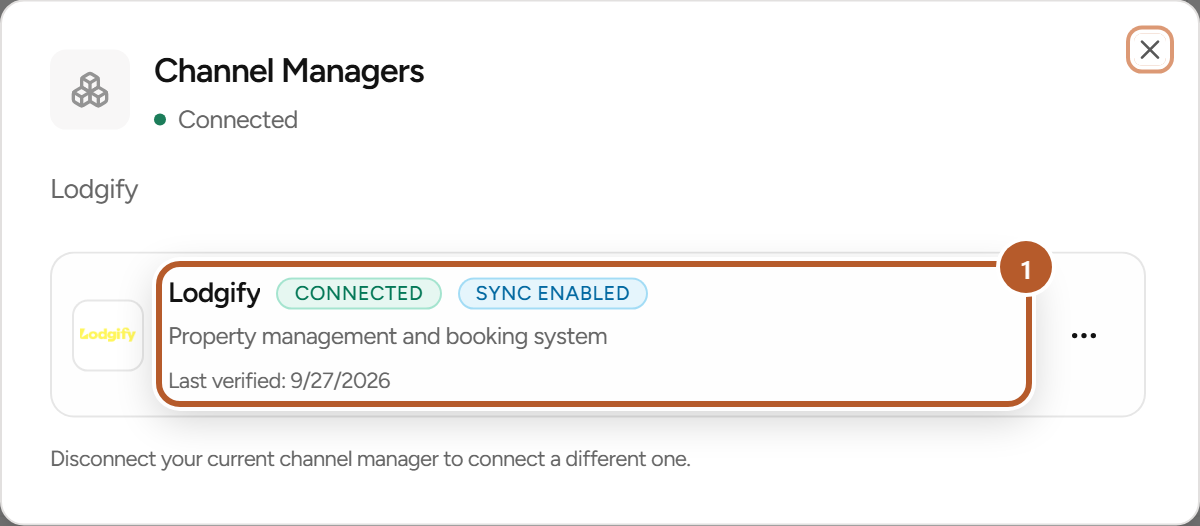
| Badge | Meaning |
|---|---|
| Connected | Credentials verified |
| Inactive | Connection disabled |
| Sync enabled or Sync disabled | Whether automatic sync is on |
| Last verified: [date] | Last time the credentials were confirmed |
If a sync fails, SparkOS creates a notification with the error and a link to the Connections tab.
FAQ
Is there a sync-now button?
Not in the current version. To force a full import, open the PMS row menu, choose Settings and save the credentials again.
What happens to the data when I disconnect?
Bookings are archived for every PMS. Properties that were active become Inactive; those you had set to Inactive or Maintenance stay as they are. Guests stay in SparkOS whatever the PMS; no property, booking or guest is deleted. When you reconnect the same PMS, the bookings leave the archive, those properties become Active again and the next sync updates the same records instead of duplicating them.
Does the initial import take long?
It can take a few minutes, as the window itself says. If something is missing, wait a moment and reload the page.
Updated on 10/2/2026