Connect your WhatsApp number (Meta)
How to link your Meta Business account to SparkOS so WhatsApp Business and Instagram work in the Inbox, campaigns and flows.
- Available on Pro and Enterprise
- For All workspace members
What it is
The Meta connection links your Facebook account to SparkOS and, through it, WhatsApp Business and Instagram: one login covers both. Once a WhatsApp number is linked, the Inbox receives and answers messages, WhatsApp campaigns and flows become available, and your account’s templates can be submitted to Meta for approval.
Before you start
- Meta & Instagram are on the Pro plan. On other plans, the card shows the upgrade notice.
- You need a Meta Business account with a WhatsApp Business number (WABA). Without a linked number, WhatsApp stays disabled in the Inbox and in automations.
- Allow pop-ups in your browser: authorization opens in a Facebook window.
Step by step
- Open Settings (/settings) and the Connections tab.
- On the Meta (Facebook) card (“WhatsApp and Instagram messaging.”), click Connect.
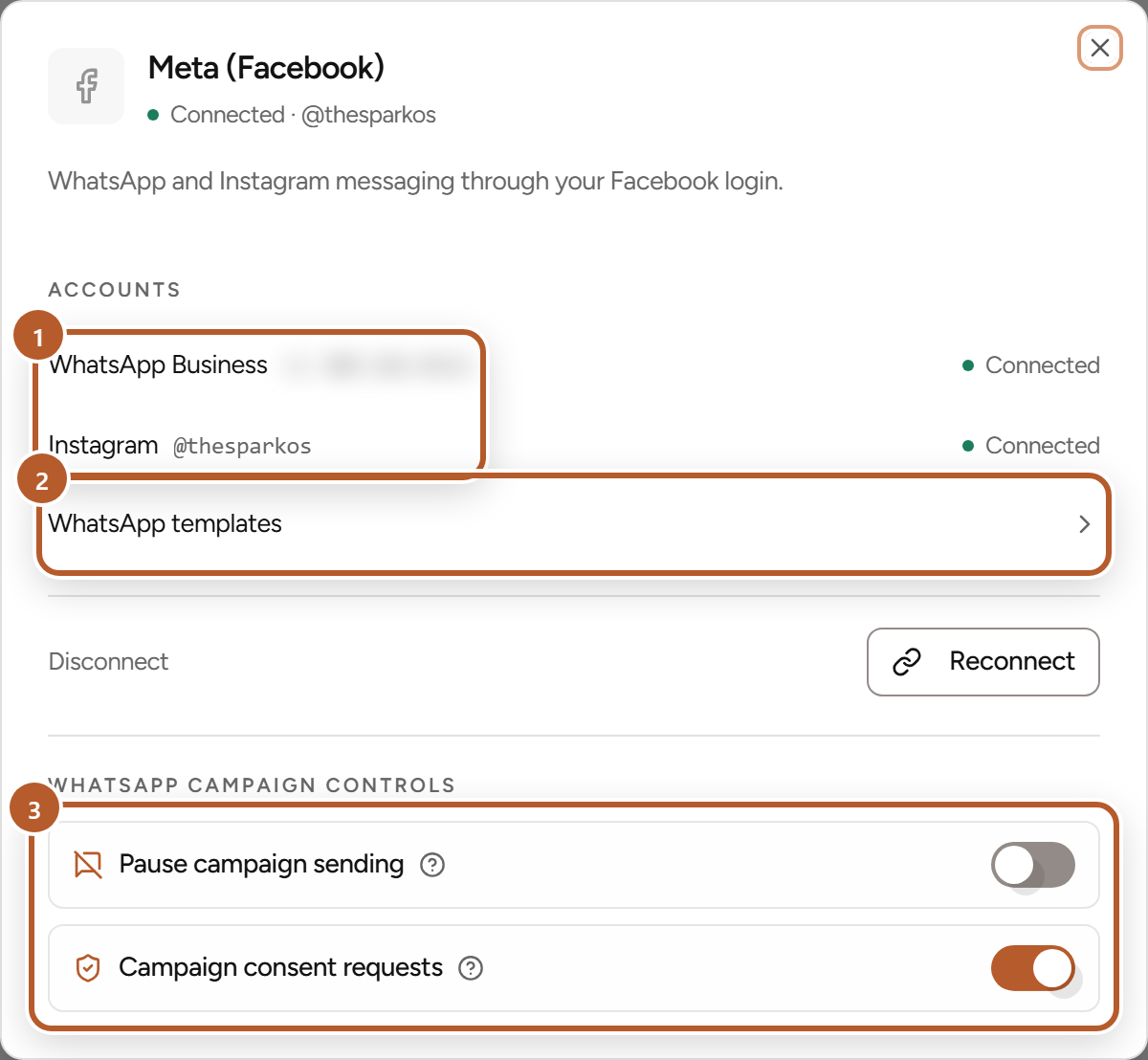
- Under Accounts, the WhatsApp Business and Instagram rows read Connected or Not linked.
- Click Connect Meta Business (or Reconnect). Sign in with Facebook and accept every permission in the dialog.
- The return window goes through “Connecting your Meta Business…” and “Saving in SparkOS…” to “Connection saved”, with the status of Facebook, WhatsApp and Instagram (Connected, Not linked or Pending). Click Continue to Settings.
Assisted WhatsApp onboarding
While WhatsApp is not connected, the Accounts section shows “WhatsApp connection: assisted onboarding”. In that case the number is activated in a guided session with the SparkOS team, booked with Schedule a connection session (Pro plan or above), and the Meta connect button connects Facebook and Instagram.
What happens next
- SparkOS stores the credentials and confirms “WhatsApp Business connected successfully!”, “Instagram connected successfully!” or both together.
- With a linked number, the SparkOS standard templates (property carousel, shop carousel and LGPD consent) and the ready-made utility templates are submitted to Meta for approval automatically.
- The card gains a WhatsApp templates row, and the WhatsApp campaign controls section shows Pause campaign sending and Campaign consent requests.
| Notice after connecting | What to do |
|---|---|
| “Facebook signed in, but no WhatsApp Business number was linked.” | Reconnect and assign a WABA phone number in Meta. |
| Instagram Not linked | Link an Instagram professional account to a Facebook Page and reconnect. |
| “WhatsApp connected, but inbound messages aren’t flowing yet.” | Finish setup in Meta before chatting with guests. |
FAQ
When do I use Reconnect?
“Reconnect to refresh tokens or grant additional permissions.” For example, when the card reports missing Instagram permissions.
What does Disconnect do?
It revokes SparkOS’s access to the Meta account. The message “Meta Business account disconnected.” confirms it.
The window closed without confirming. Now what?
If you see “SparkOS did not confirm the connection in time.”, check the Connections tab: the connection may still have completed.
Updated on 10/2/2026