Instagram: reply publicly under the comment
A public reply under the person's comment that tags them by their @ and says the rest arrived by DM, without spending the 24-hour window.
- Available on Pro
- For Owner and team members with the Marketing & Studio permission (Marketing role)
What it is
The Instagram reply step with Delivery type = Public reply under the comment posts a reply under the person’s comment, visible to everyone who opens the post. It gives social proof (“sent it to your DMs 😉”) and tags the person: in a public reply, {{instagram_handle}} becomes a real mention, and the person gets the Instagram notification.
The public reply does not depend on the 24-hour window or on the private reply: one flow can do both on the same comment. SparkOS posts at most one public reply per comment, even when the webhook delivers the same comment twice.
Before you start
- Instagram connected under Settings → Connections.
- A flow with the Instagram comment trigger: a public reply needs a comment to sit under. On a run that started from a DM, this step fails with “This run did not start from a comment”.
Step by step
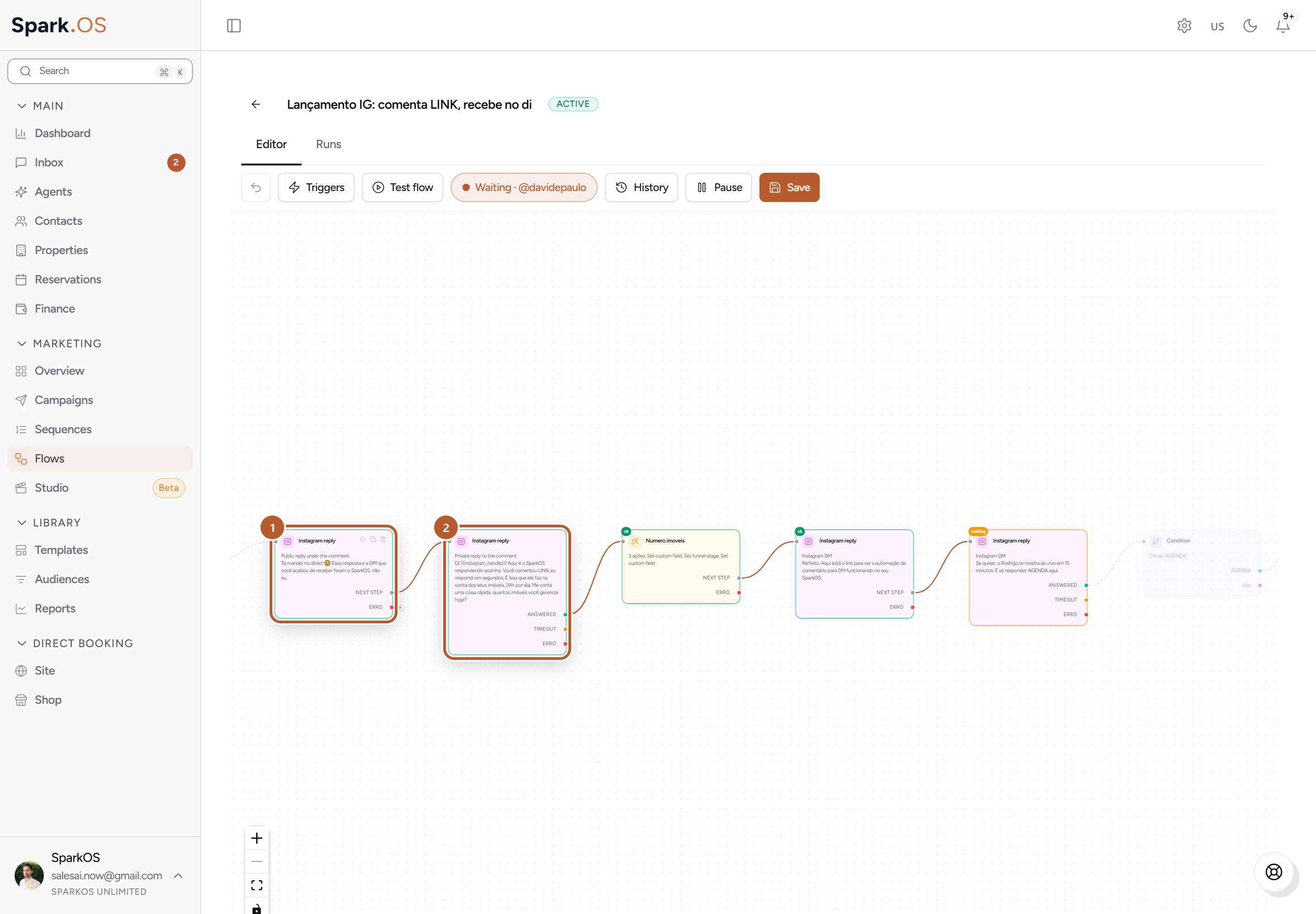
- Open the flow under Marketing → Flows and add an Instagram reply step right after the trigger.
- Under Delivery type, choose Public reply under the comment. Under Action, only Message only is available: a public reply neither asks for a reply nor carries a link.
- Write the Message. The hint below the field reminds you: “Use {{instagram_handle}} to tag the commenter — in a public reply Instagram turns the @ into a real mention and notifies them.”
- Connect the output to an Instagram reply with Private reply to the comment if you want to continue in private (see Instagram: ask for a reply, then send the link by DM). In the example flow the order is: public reply → private reply asking for YES → direct message with the link.
- Save and Activate.
What happens next
- The reply shows on the post as a reply from your account, a few seconds after the comment.
- In Studio → Comments, the comment’s row reads Replied once the flow claimed the comment.
- In the Inbox, the public reply is also recorded in the person’s conversation as a message from you; it does not open the 24-hour window.
- If the person deletes the comment, the reply goes with it.
FAQ
Can I put a link in the public reply?
No. The Send the resource (link) action only exists on the direct message. A public reply is public and records nobody’s consent.
Can I reply publicly to an old comment?
The public reply has no 7-day limit like the private reply, but the flow only runs for comments that arrive after the flow is active.
I commented on my own post and nothing happened.
Comments from the connected account itself are treated as echoes and ignored. Test from another account.
I want to hide comments instead of replying.
That is done by hand in Studio → Comments, with the hide or unhide button on each row. There is no flow step for hiding.
Updated on 10/10/2026