The Inbox
One list for your WhatsApp, Instagram and PMS conversations, with direct WhatsApp replies inside the 24-hour window.
- Available on All plans
- For Owner and team members with the Inbox permission
What it is
The Inbox brings guest conversations from every channel connected to SparkOS into one list: WhatsApp and Instagram (through the Meta connection) plus the messages synced from your PMS (Stays.net, Lodgify or Guesty). Each conversation shows the full history, the guest’s details and the booking tied to it. Direct replies go out on WhatsApp, on Instagram and, for Stays.net bookings, through the PMS itself.
Before you start
- To reply on WhatsApp, a number must be connected under Settings → Connections and Send via WhatsApp (in the Notifications tab) must be on. WhatsApp requires the Pro plan.
- Without a reply channel the conversation is read-only: “SparkOS keeps the full conversation history here for context, campaigns, and automations.”
Step by step
- Open Inbox in the sidebar (/inbox). The number next to it counts unread conversations.
- Filter the list by channel (All, Email, WhatsApp, Instagram and, when you have Guesty conversations, Guesty), use the magnifier (Search conversations…) or the archive icon to switch between Active and Archived.
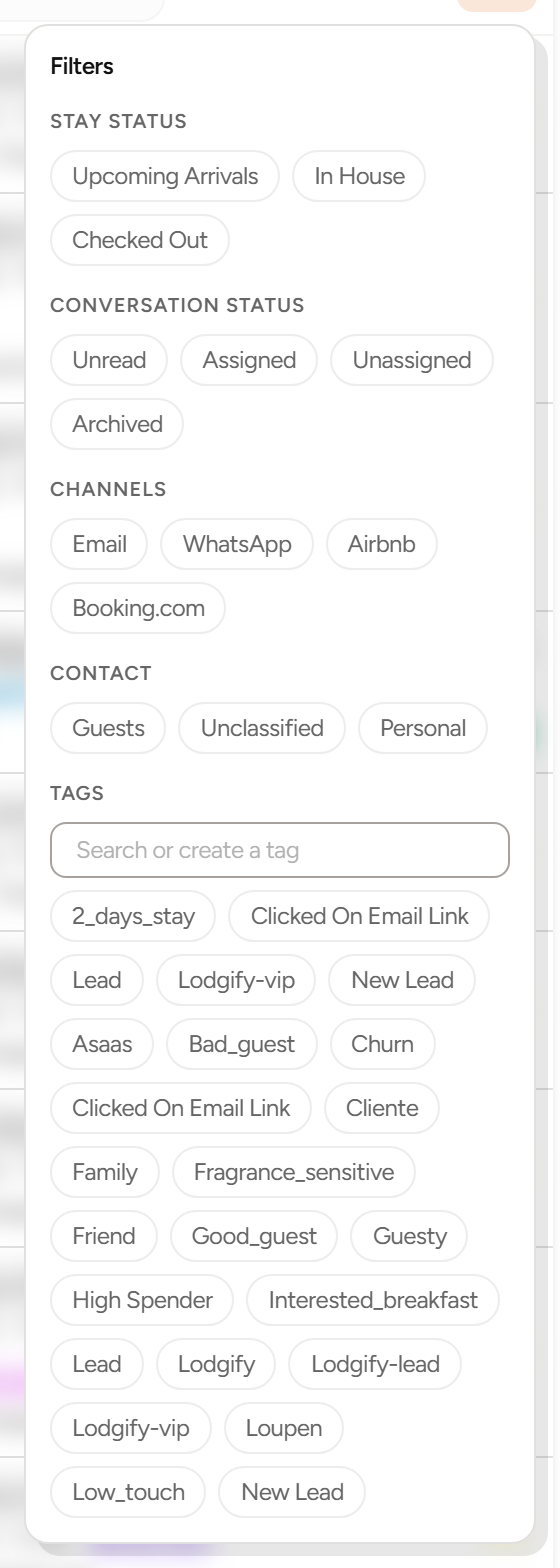
- Open Filters to combine criteria; Clear all resets them.

| Group | Options |
|---|---|
| Stay Status | Upcoming Arrivals, In House, Checked Out |
| Conversation Status | Assigned, Unassigned, Archived, Unread |
| Contact | Guests, Unclassified, Personal |
| Tags | tags added on conversations |
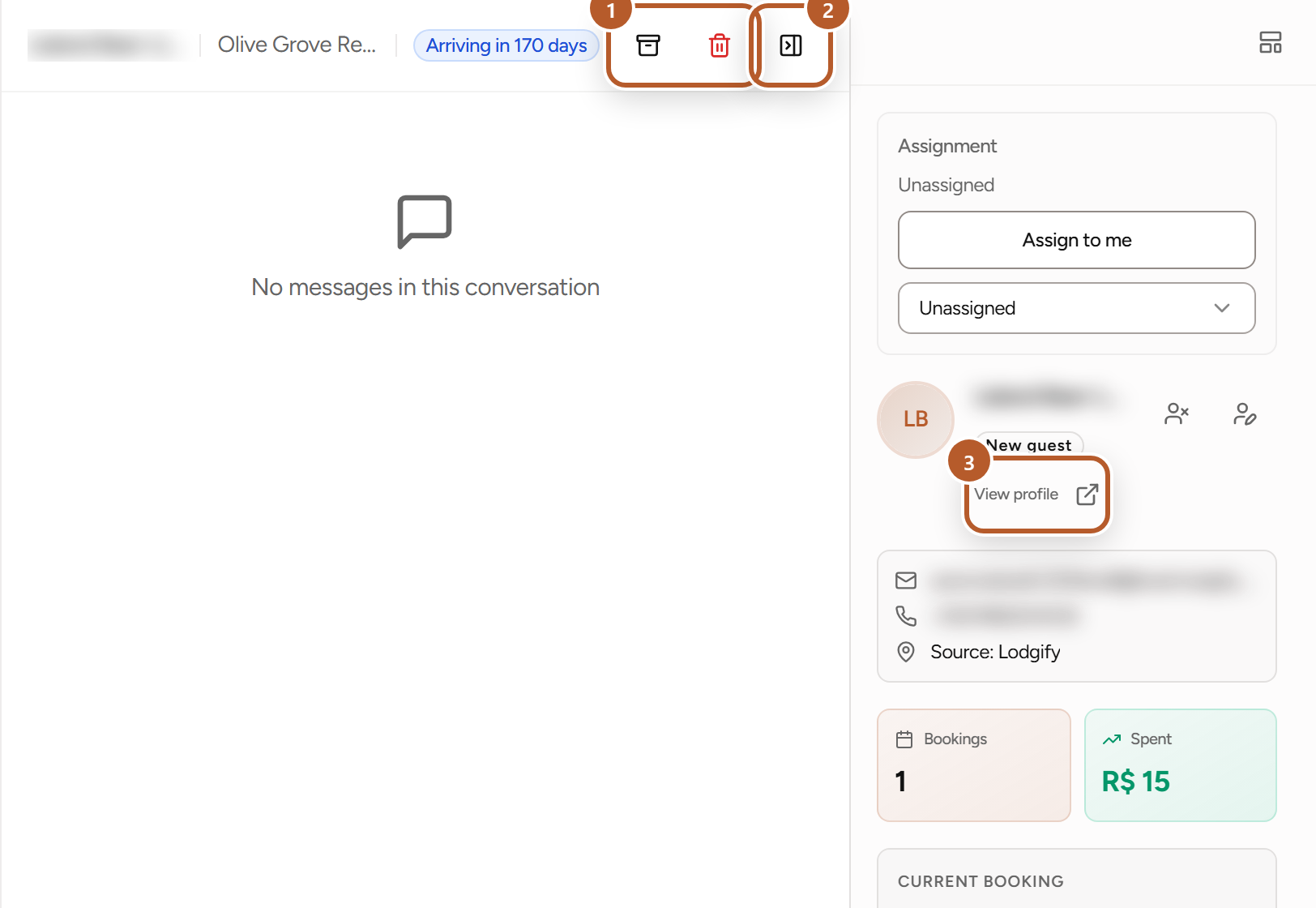
- Select a conversation. The top bar shows guest, property and booking, with Archive conversation and Delete conversation. The side panel holds Notes, Tags & info and View profile.
- Inside the 24-hour window, write in Type a WhatsApp message… and click Send. Use Attach file to send media.
- Once the window has closed, the field says the window is closed and asks for a template to re-engage. Click Templates, pick an approved template with Use and confirm with Send template.
Instagram, Stays.net and Guesty
On Instagram, free text works inside the 24-hour window the guest opens (Type an Instagram message…). On Stays.net, the reply is delivered by the PMS to the channel the guest booked on.
Replying to Guesty conversations is a pilot turned on per account. On those accounts, in a Guesty-only conversation, the reply field, which says the reply is sent through Guesty, takes text only, with no 24-hour window, and the reply goes out on the last channel of the conversation. If the text has something the channel does not accept (on Airbnb: links, phone numbers, emails or “checkout”), the send is refused with a list of what to remove. On other accounts, the conversation stays read-only.
What happens next
The sent message joins the conversation history. Archiving moves the conversation out of Active; Restore conversation brings it back. Deleting opens “Delete this conversation?”: the message history is removed for good, but the contact and their bookings stay saved.
The warning reminds you that if the conversation comes from a PMS or a connected channel, it may reappear on the next sync; in that case, archive it instead.
FAQ
Why is the WhatsApp filter missing?
It only shows with a connected number, a plan that includes WhatsApp and Send via WhatsApp on under Notifications.
Can I assign a conversation to a teammate?
Yes. In a team workspace, the Assignment control offers Assign to… with the active members.
Why can’t I type in the WhatsApp conversation?
The 24-hour window has closed: the guest has not messaged you in the last 24 hours. Until they reply, only pre-approved templates can be sent.
What is a “Personal” contact?
In the guest panel, Mark as personal contact (excluded from campaigns, funnel and assistant) takes the contact out of campaigns. The Personal filter lists these contacts.
Updated on 10/2/2026