Marketing: overview
Where each Marketing section sits in the sidebar and what the Overview shows: cards, what needs attention and what changed last.
- Available on All plans
- For Owner and team members with the Marketing & Studio permission (Marketing role)
What it is
Marketing is a group in the sidebar, and each section is its own page: Overview, Campaigns, Sequences, Flows and Studio (marked Beta) and, under Library, Templates, Audiences and Reports. At the top of every page a line shows where you are, for example Marketing / Flows; on the three lists it also shows the total number of items. The Overview sums up the lists and points out what needs attention.
Step by step
- In the sidebar, in the Marketing group, click Overview (/marketing).
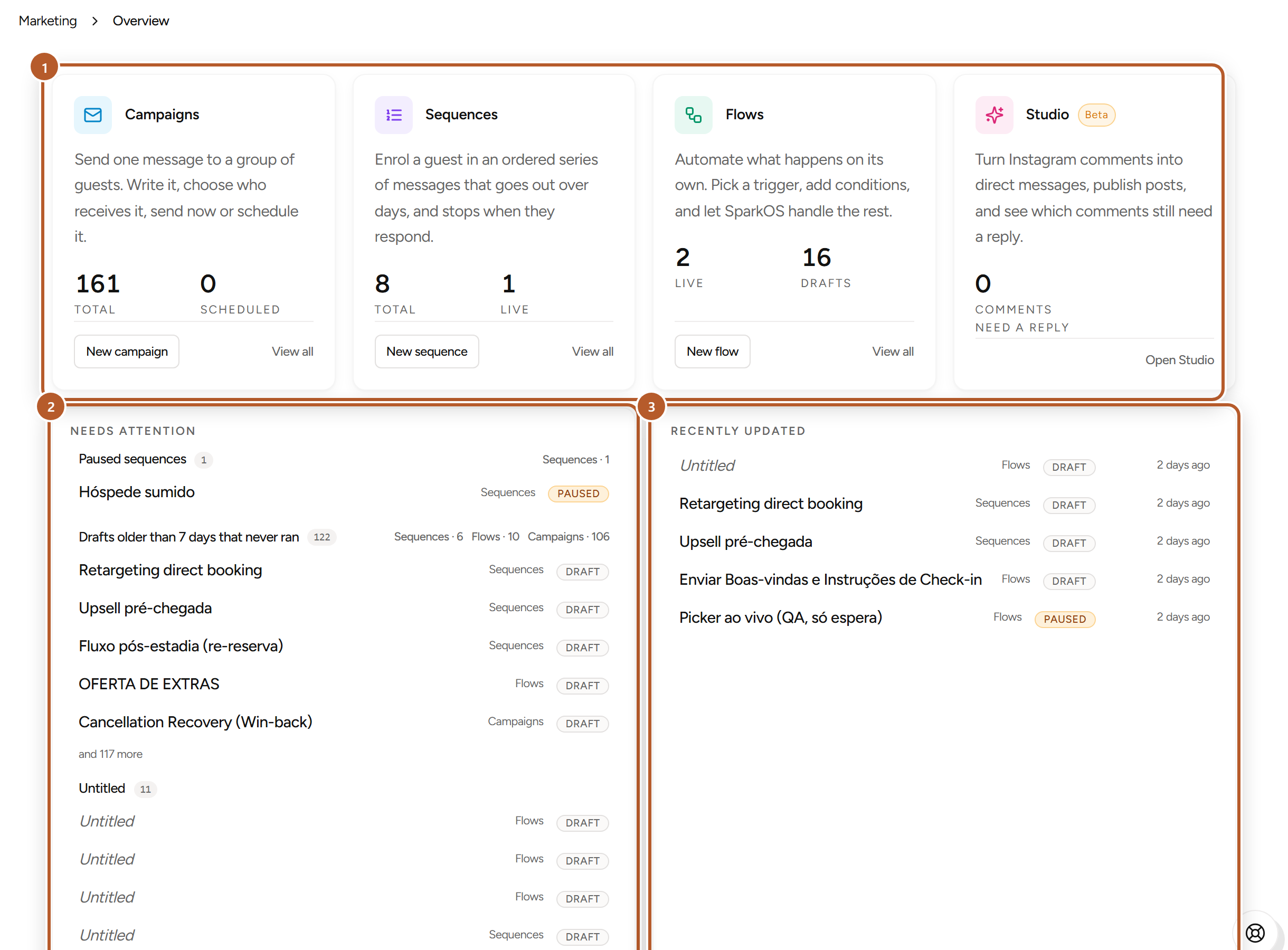
- Read the cards. Campaigns shows the total and the scheduled ones; Sequences, the total and the live ones; Flows, the live ones and the drafts; Studio, the comments that need a reply.
- On each card, View all opens the list, and New campaign, New sequence or New flow opens the list with the create options already showing. On the Studio card the link is Open Studio.
- Under Needs attention, check the groups that show up: Paused sequences, Drafts older than 7 days that never ran, Untitled and Duplicate names (the same name on more than one item across the three lists). Each group shows up to five items and says “and N more” when there are others. Click an item to open it.
- In the Paused sequences and Drafts older than 7 days that never ran groups, links such as Sequences · 2 open the list already filtered by that status.
- Under Recently updated, see the five items changed most recently, with their list, status and how long ago they changed.
- To switch sections, use the sidebar. In the top line, Marketing takes you back to the Overview. While you edit a campaign, a sequence or a flow, the matching item stays highlighted in the sidebar.
Who sees each item
| Menu item | Shown to |
|---|---|
| Overview and Templates | Anyone with Marketing access |
| Campaigns, Sequences, Flows, Audiences and Reports | Anyone with campaign access |
| Studio | Anyone with Studio access |
Without campaign access, the Overview shows only the Studio card, when there is Studio access. Extras, and Site when your account has access, sit in another sidebar group: Direct booking.
FAQ
Where did Templates, Audiences, Reports and Transactional go?
To the Library, in the same sidebar group. Transactional emails are a view of the Reports page.
Do my old links still work?
Yes. Addresses such as /marketing?tab=fluxos, /campaign-reports, /transactional-email-reports, /automations and /studio lead to the matching new page.
What about the collapsed sidebar?
The group becomes a single Marketing icon that opens the Overview.
Updated on 10/2/2026